> For the complete documentation index, see [llms.txt](https://docs.talordata.com/llms.txt). Markdown versions of documentation pages are available by appending `.md` to page URLs; this page is available as [Markdown](https://docs.talordata.com/proxy/integrations/edge-talordata-integration-guide.md).
# Use Talordata Proxies with Edge
Set up Talordata proxies in Edge with step-by-step guidance for host, port, authentication, and connection testing.
Configuring proxies in Edge can assign a dedicated IP to your browsing activities, suitable for privacy protection, accessing restricted content, and more.
{% hint style="success" icon="lightbulb-exclamation-on" %}
Before configuring the proxy, you need to obtain proxies credentials. [Click here](/proxy/rotating-residential-proxies/rotating-residential-proxies-quick-start.md) to learn how to obtain proxies credentials.
{% endhint %}
***
{% stepper %}
{% step %}
#### **Open Edge Settings**
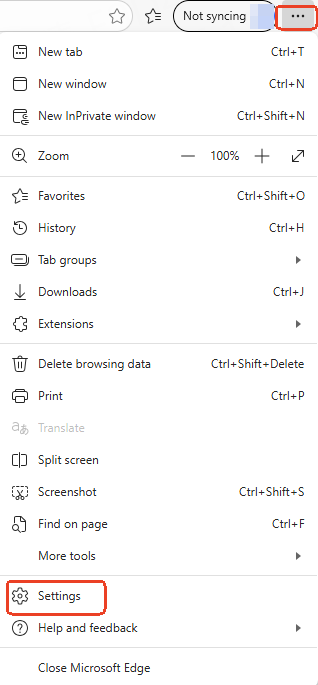
Click the three-dot menu in the upper right corner of Edge, then click **Settings**.
{% endstep %}
{% step %}
#### **Enter Proxy Settings**
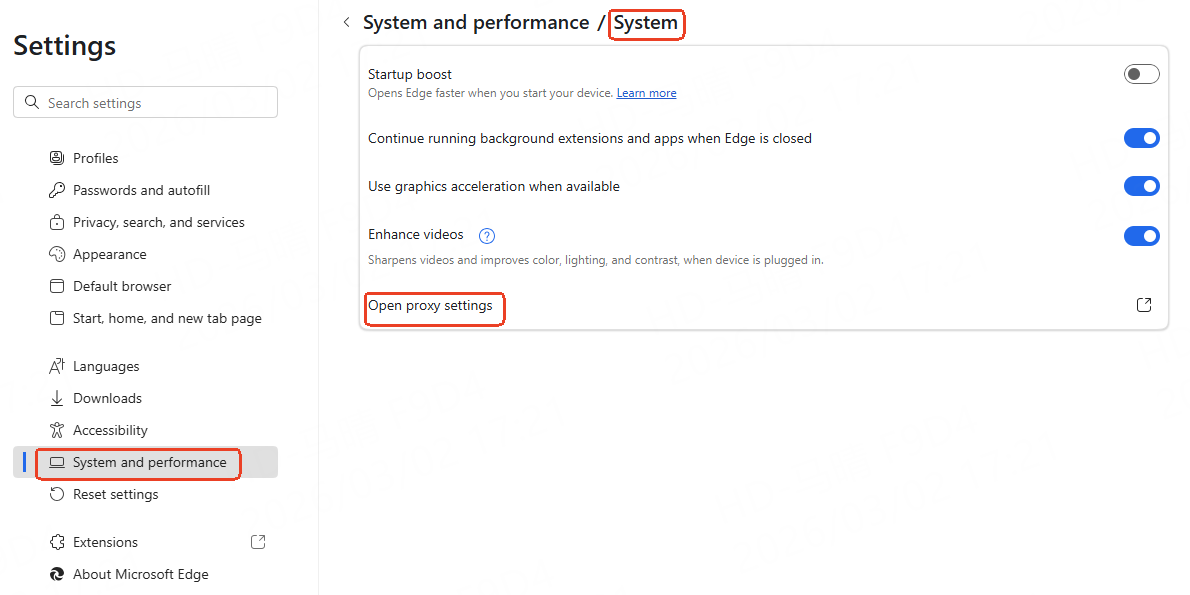
Navigate to **System and Performance** → **System** → **Open proxy settings**. Windows will open the proxy settings window.
{% endstep %}
{% step %}
#### Configure the Proxy
Toggle **Use a proxy server** to On. Enter the proxy host and port in the address fields, then click **Save**.
{% endstep %}
{% step %}
#### **Enter Authentication Information**
Open Edge. The first time you access a website through the proxy, the browser will display an authentication window. Enter your username and password.
{% endstep %}
{% step %}
#### **Verify the Proxy**
Visit [ipinfo.io](https://ipinfo.io/) in Edge and confirm whether the displayed IP matches your proxy IP.
{% endstep %}
{% endstepper %}
***