> For the complete documentation index, see [llms.txt](https://docs.talordata.com/llms.txt). Markdown versions of documentation pages are available by appending `.md` to page URLs; this page is available as [Markdown](https://docs.talordata.com/serp-api/integration/mcp-integration/openai-chatgpt-mcp-server-integration.md).
# OpenAI ChatGPT MCP Server Integration
Integrate Talordata MCP Server with OpenAI ChatGPT to give AI agents access to real-time SERP data and structured search results.
With just a few setup steps, you can connect ChatGPT to the TalorData MCP server, enabling real-time web search, scraping, and structured data access for your custom GPTs.
#### **P**remise:
* [TalorData account](https://www.talordata.com/)
* OpenAI account
{% stepper %}
{% step %}
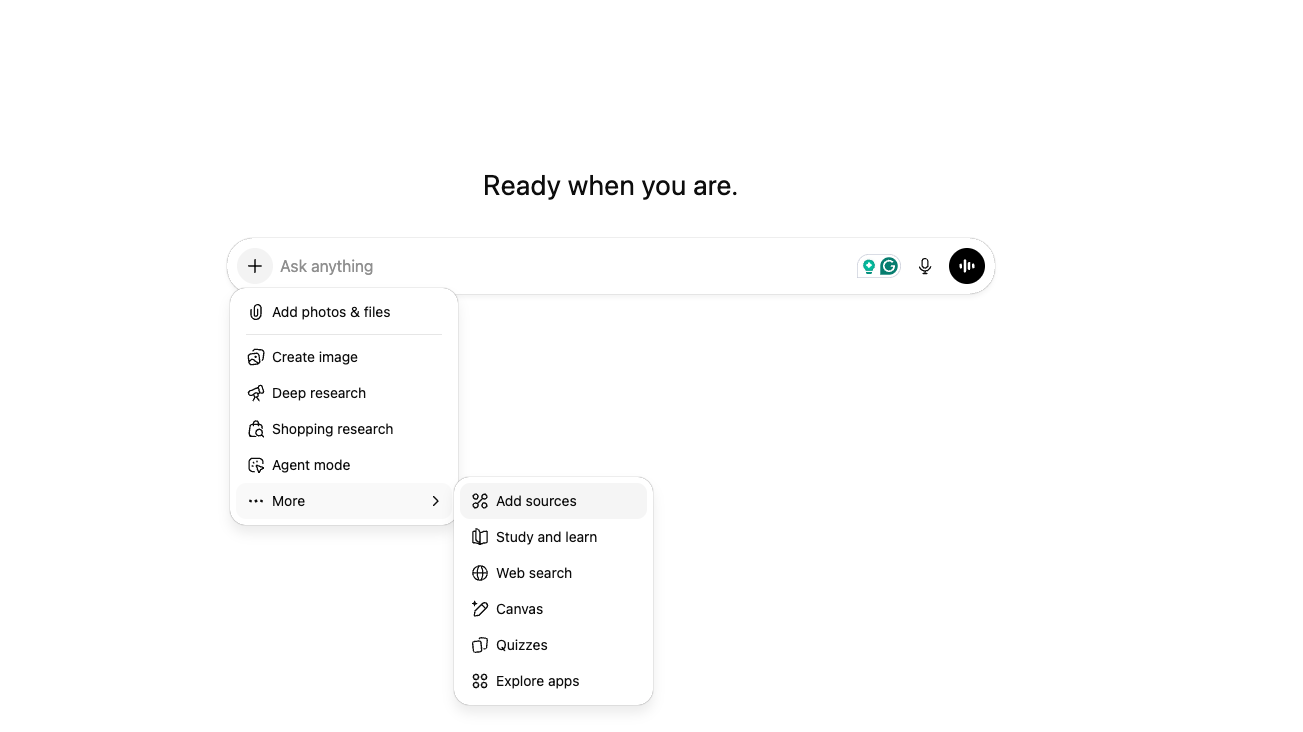
#### Add new source
Go to [ChatGPT](https://chatgpt.com/),click the "+" button to add a new source.
{% endstep %}
{% step %}
#### **Connect more**
Click the "Add" button, then select "Connect more."
{% endstep %}
{% step %}
#### Advanced Settings
Click "Advanced Settings," enable Developer Mode, and then click "Create app."
{% endstep %}
{% step %}
#### Connect to TalorData MCP
Click "Create App" and fill in the following details:
* **App Name**
* **MCP Server URL:**
```
https://mcp.talordata.net/YOUR_USER_TOKEN/mcp
```
* Authentication: **No auth**
It should look like this:
{% endstep %}
{% step %}
#### Unlock the network
Tag TalorData MCP to chat freely on open networks without worrying about being blocked!
{% endstep %}
{% step %}
#### Monitor usage
View your API usage in the [TalorData SERP API usage logs](https://dashboard.talordata.com/scraping/serp-api/history).
{% endstep %}
{% endstepper %}